An editing tool for the Anki cards you already have.
Nexora adds a panel beside the Anki reviewer. It reads the card in front of you and tells you what is wrong with it, the mechanism underneath the fact, or what it gets confused with. And when a card needs rewriting, it shows you exactly what would change, before and after, and nothing is saved unless you approve it.
Free, and it runs on an API key of your own. No card, no subscription. Requires the desktop version of Anki, 2.1.50 or later.
Install code
2101712425Paste it into Get Add-ons in Anki. Click the number once to select all of it.
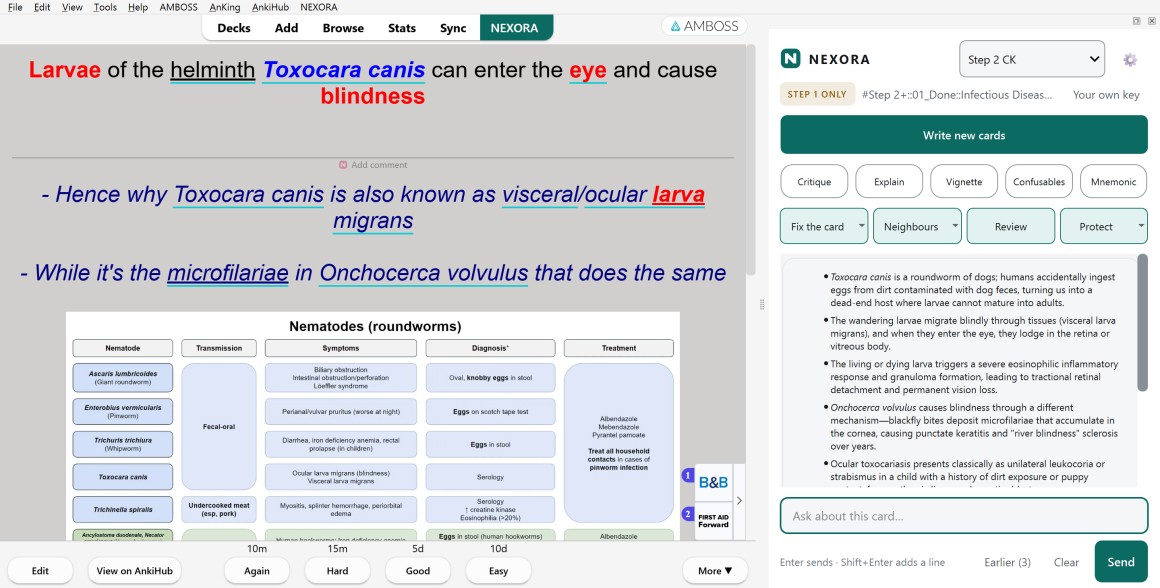
The panel, open beside a card in the Anki reviewer.
Getting it
Install it, add a key, and it works
Install from AnkiWeb through Tools → Add-ons → Get Add-ons in Anki. Open the Nexora panel and create a free account, which is what lets Nexora load its prompts. Then paste an API key under the gear icon, Connection. Any one of Anthropic, OpenAI or Google will do, and Nexora uses whichever you give it.
Two things to know before you do
The honest caveats, up front
It needs an API key of your own. Nexora is free. The model that answers is not: you bring a key from Anthropic, OpenAI or Google, and they bill you directly for what you use. Most students spend a few cents a week.
It sends card text away to be answered. When you press a button or ask a question, the text of the card you are on leaves your machine and the answer comes back. Nothing is sent while you are simply reviewing, and your collection is never uploaded. The full detail is on the privacy page.
Who it is for
Built for a large collection in a dense subject
Medical students, residents and doctors, who keep some of the largest and most tightly written Anki collections there are. Nexora applies SuperMemo's rules for card formulation, so a critique says “this is three facts in one card” rather than “consider revising”.
If your deck is not medicine, there is a setting for that. Tell it you are studying something else and it drops the exam framing entirely and works in your own subject's terms instead.
Asking about a card
What it does
These read the card and answer. Nothing is written to your collection.
Critique
What is actually wrong with this card, judged as a card rather than as a sentence.
Explain
The mechanism underneath the fact, not a restatement of the answer.
Confusables
What this gets mistaken for, and the feature that separates them.
Vignette
Turn the fact into a clinical vignette, so you practise recognising it in context rather than as a bare statement.
Mnemonic
Something to hang it on, for the facts that are genuinely arbitrary.
Ask about the card
A chat box beside the reviewer that can see the card you are on, for the question a button does not cover.
Answers are kept. The last ten for each card stay on your own computer, so coming back to a card next month shows what it said before rather than charging you for it again. They are never sent anywhere, and there is a switch to turn it off and a button to delete them.
Changing a card
And when a card needs rewriting
Every one of these shows you the before and the after first. Nothing reaches your collection without you approving it.
Overhaul
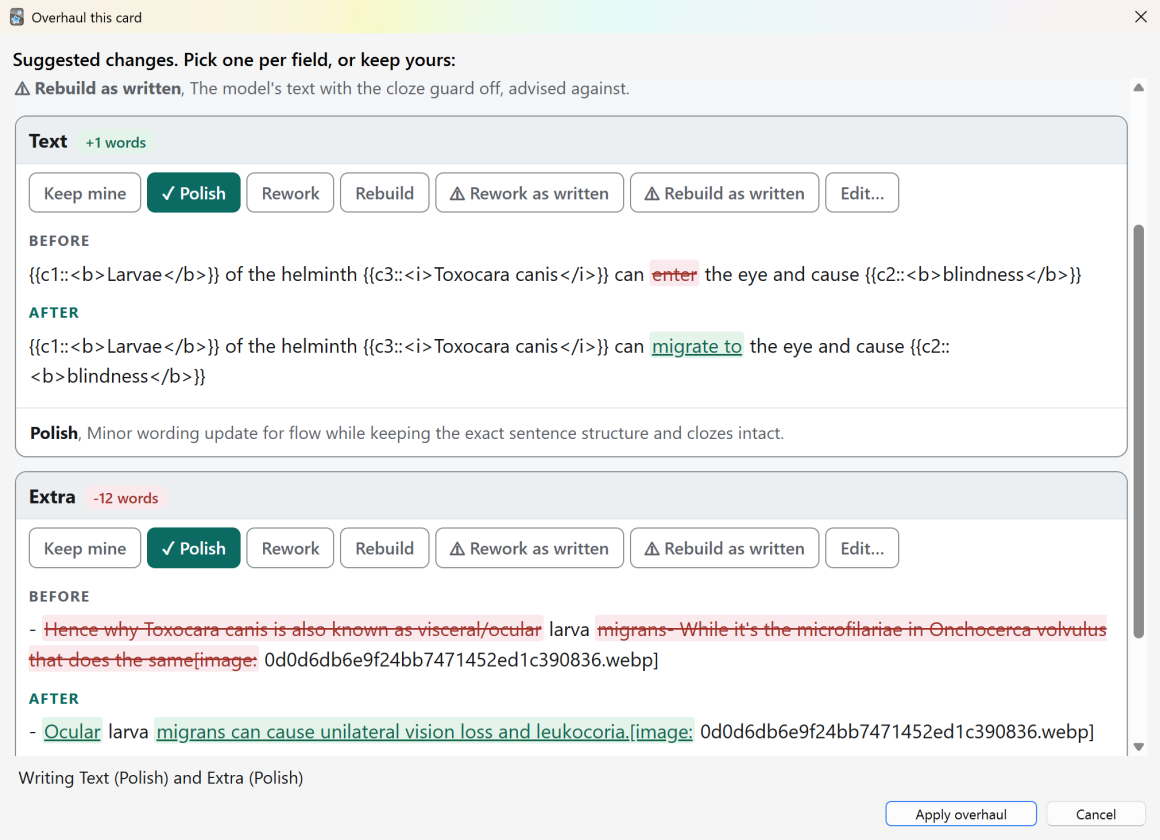
A full rewrite, offered as three versions, each shown against the card you have now. Nothing reaches your collection without you seeing it first.
Fact-check
Flags statements on the card that look wrong, each with its reasoning, and offers a correction you approve.
Add high-yield notes
Appends mechanism and discriminators to the notes field. The front is never touched.
Make it solvable
For cloze cards that cannot be answered from their own text. Adds a hint, or the missing context.
Emphasis only
Bolds the key terms and changes not one word.
Pronounce
Reads a selection aloud, for the drug names you have only ever read.
Before anything is saved
You read the change, then you approve it
An Overhaul offers three versions of the card and shows you exactly what would differ, field by field, with the reasoning behind each one. Removed words are struck through, added words are underlined. Take one version, take part of one, or take none.
Keeping the work
A shared deck will not overwrite what you wrote
If you study from AnkiHub, the maintainers' version of a note is pushed over your copy on the next sync. That is the point of a shared deck. It is also how an hour of rewriting disappears with no warning and no undo.
One press tags the fields Nexora edited, and AnkiHub then leaves those alone while still updating everything else. You can pick the fields yourself instead, or have it happen automatically. None of it is sent anywhere: a protected field is a tag on your own machine. How each of those works.
Away from the reviewer
Turning your own notes into cards
Sometimes what you need is not on a card yet. It is sitting in a paragraph of your own notes, or in what you wrote down after a bad practice test.
Write new cards
Paste a paragraph from your own notes or a lecture and get it back as cards, in the shape your collection already uses. They arrive as a tick-list showing the change, and nothing is added until you tick it.
Nothing here is held back for a paid tier, because there is no paid tier. Writing cards is the heaviest thing Nexora does, and on your own key you decide what it is worth.
While you review
Your own notes on the card, without rewriting the card
Five things that sit in the reviewer and the editor. None of them needs your API key, and none of them sends anything anywhere: they run on your own computer, and they work offline.
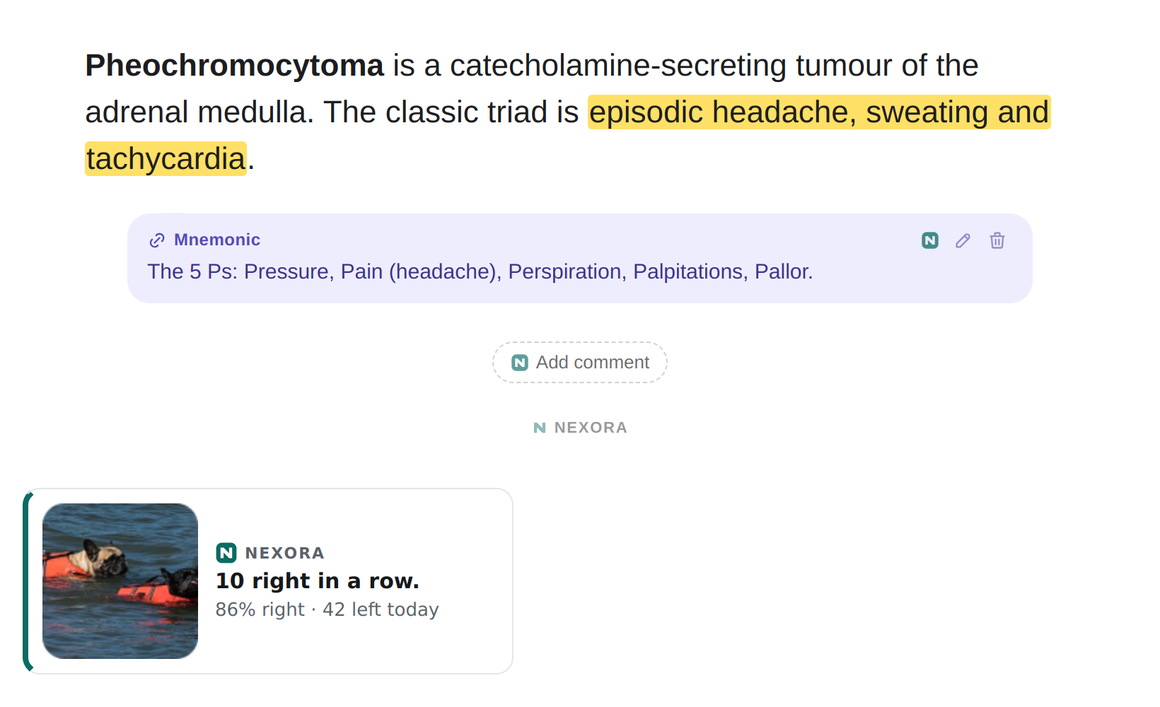
Card comments
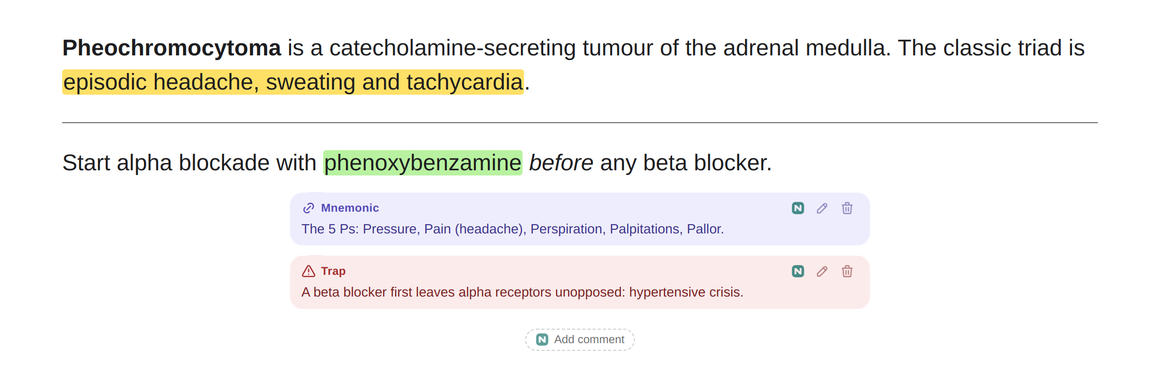
Leave yourself a hint, an explanation, a mnemonic or a trap, shown as a bubble before the answer, after it, or both. Hints on the front stay blurred until you click them. Comments stay on this computer and are never written into the note.
Highlights
Select words on a card and highlight them in one of four colours. Like comments, they are kept beside the note rather than in it, so an AnkiHub update cannot take them away.
Edit during review
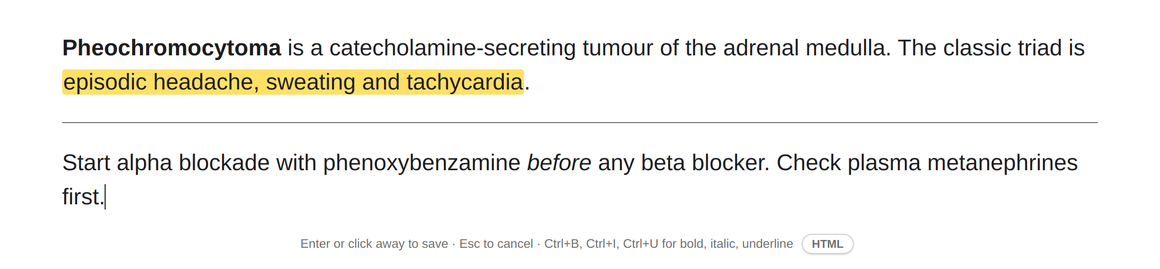
Ctrl+click a field to fix a word without leaving review. Only the text and its bold, italic and underline can change; images, cloze markers and the rest of the field are locked, and Ctrl+Z undoes it.
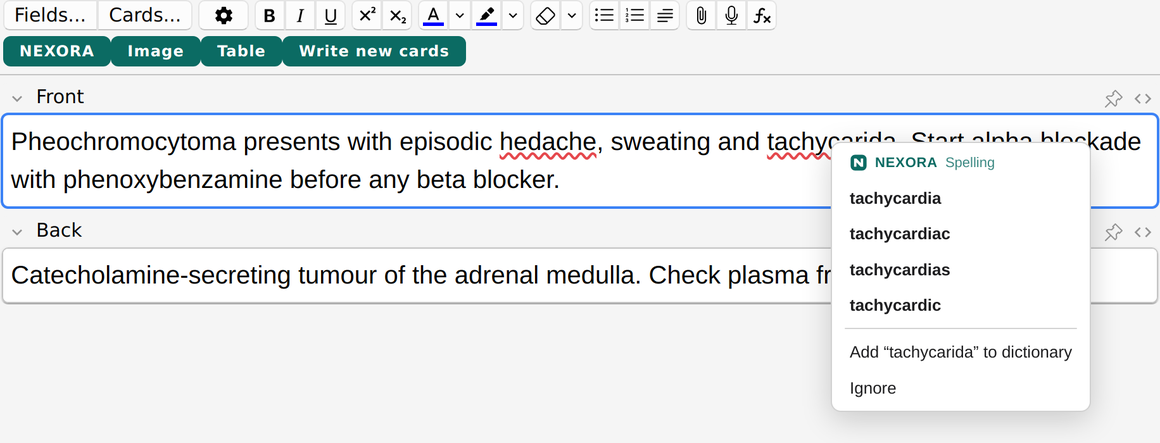
Spell check
A red line under a word that is spelled wrong, here, in Anki's editor and in Nexora's own boxes. It knows medical terms, drug names and eponyms, takes British and American spelling as equally correct, and leaves acronyms, doses and words like mRNA alone.
A study buddy
A small popup when something happens in a session: ten right in a row, halfway through the day, the last card due. Your real progress beside a photo of a cat, a dog or your own pet. You choose how often, or switch it off.
Everything you have already done
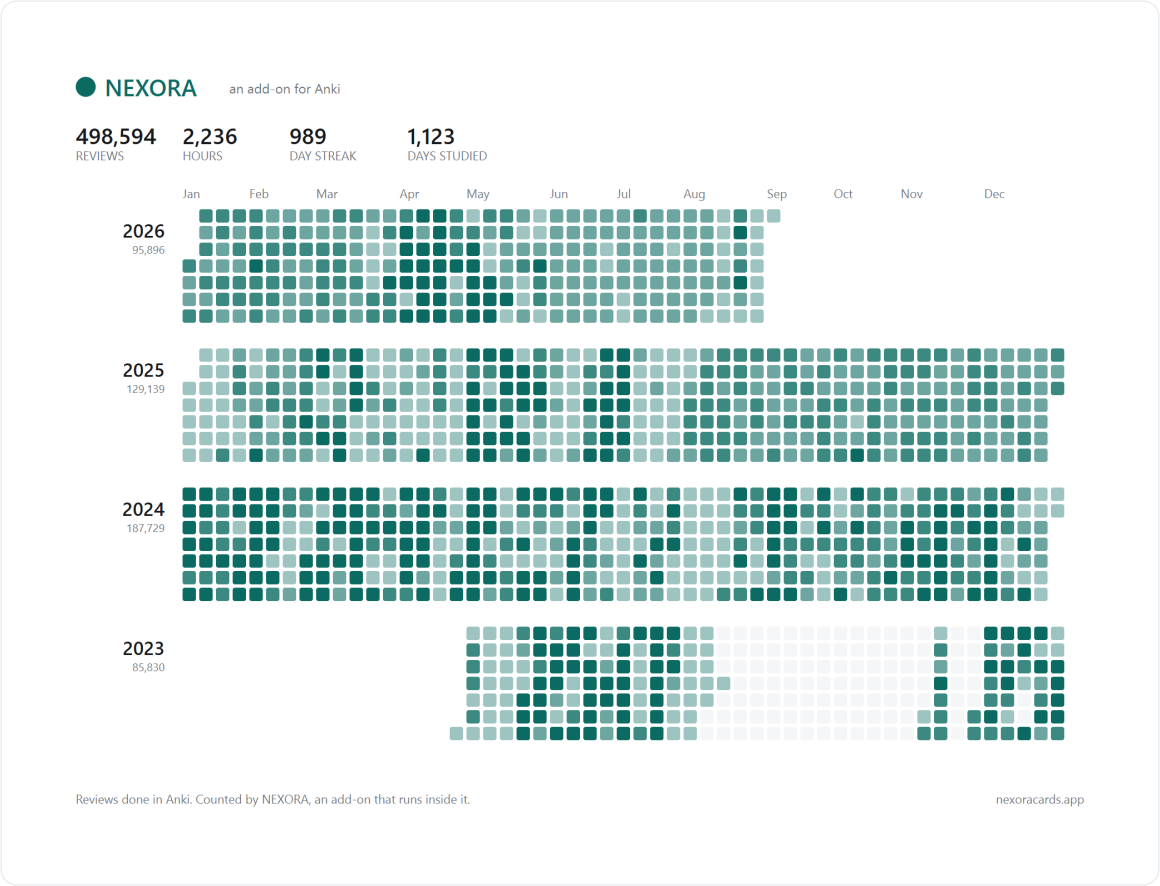
Four years of work should look like four years of work
A heatmap sits on your deck list, and on each deck of its own. Every year you have used Anki gets a row, so a collection that is four years old reads as four years old rather than as the last twelve months. Click a day to see the cards you reviewed that day.
Worth showing somebody
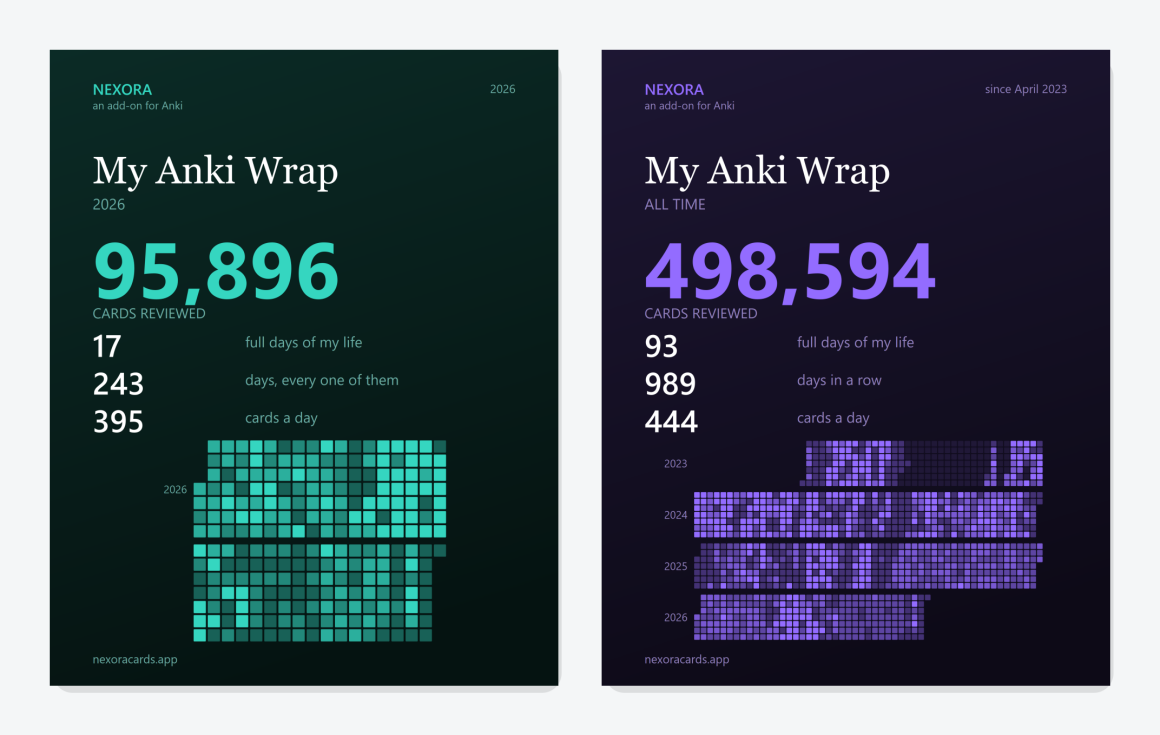
My Anki Wrap
The same work, made into something you would actually post. Your session, your week, this year, or everything since the day you started.
Sized for where it goes
A square post or a full-height story, saved as an image or copied straight to the clipboard. Both of the posters below are the same feature: it takes the colour you picked, and so does everything else on this page.
It will not flatter you
Ask for a Wrap of a quiet week and it declines and says why. A poster of four days is not worth showing anybody, and pretending otherwise is how these things stop meaning anything.
When the deck is finished
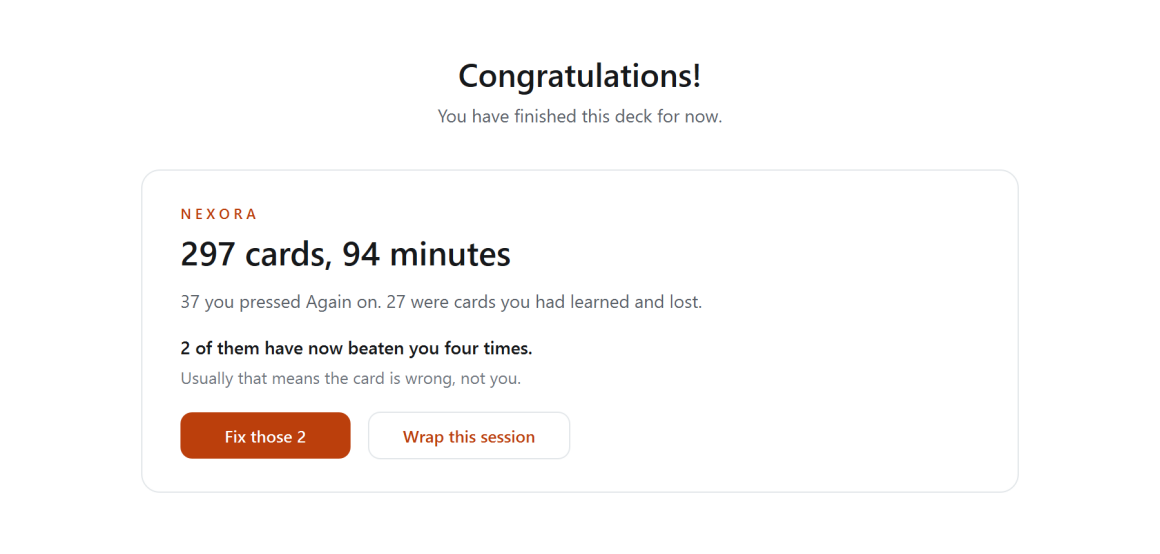
The screen that used to say nothing
Anki congratulates you and stops. This is the moment you know which cards hurt, and it is the only moment you will agree that a card is the problem rather than your memory.
It leads with the cards you had already learned and then lost, not with every Again you pressed. On a normal day those differ by more than ten to one, because most Again presses are new cards behaving exactly as new cards should. Of a few hundred reviews it is usually one or two cards that have genuinely beaten you, and the button opens those and nothing else.
Why it fits
What makes the answers fit your collection
- Neighbours. It searches the rest of your collection, so a rewrite does not quietly create a near-duplicate of a card you already have. Built and stored on your own machine.
- Style matching. It measures how your cards are written, per note type, and matches them, so an edited card does not read as foreign next to its neighbours.
- Your own notes. Point it at your own reference notes and it draws on those rather than answering from memory. They are indexed once on your own machine, with no network call at all, and only the few lines that match the card travel with a request.
- Readable on your phone. No add-on runs on AnkiMobile or AnkiDroid, this one included, but the notes it writes sync there like any others. It can also add a small block to your note type's styling that applies only on narrow screens, leaving the desktop exactly as it was.
- AnkiHub-safe. It can tag the fields it edits so a later sync does not overwrite your work. How that works.
What it costs
Nexora is free. You pay the model, not us.
There is nothing to buy here and no subscription to cancel. You add an API key from Anthropic, OpenAI or Google, and that provider bills you for exactly what you use, at their published rate, with no margin added by us.
Scope
What Nexora is, and what it is not
- It is software you install into Anki. It works on the cards already in your own collection, on your own machine.
- You approve every change. Nothing is written until you accept it.
- It is not a course or a publisher. We do not sell or reproduce anyone else's teaching material, and we are not affiliated with any school, publisher or testing body.
- It is not medical advice. It works on flashcards, it can be confidently wrong, and it is no substitute for a clinician or a guideline. The terms say so too.
- It makes no images, video or synthetic voices. It writes and edits text inside your private collection, and publishes none of it. Pronounce uses the voices already on your computer.
- It does not decide anything about you. No scoring, ranking, profiling or automated assessment.